Team and roles
Team and roles: one plan, one pool, three roles
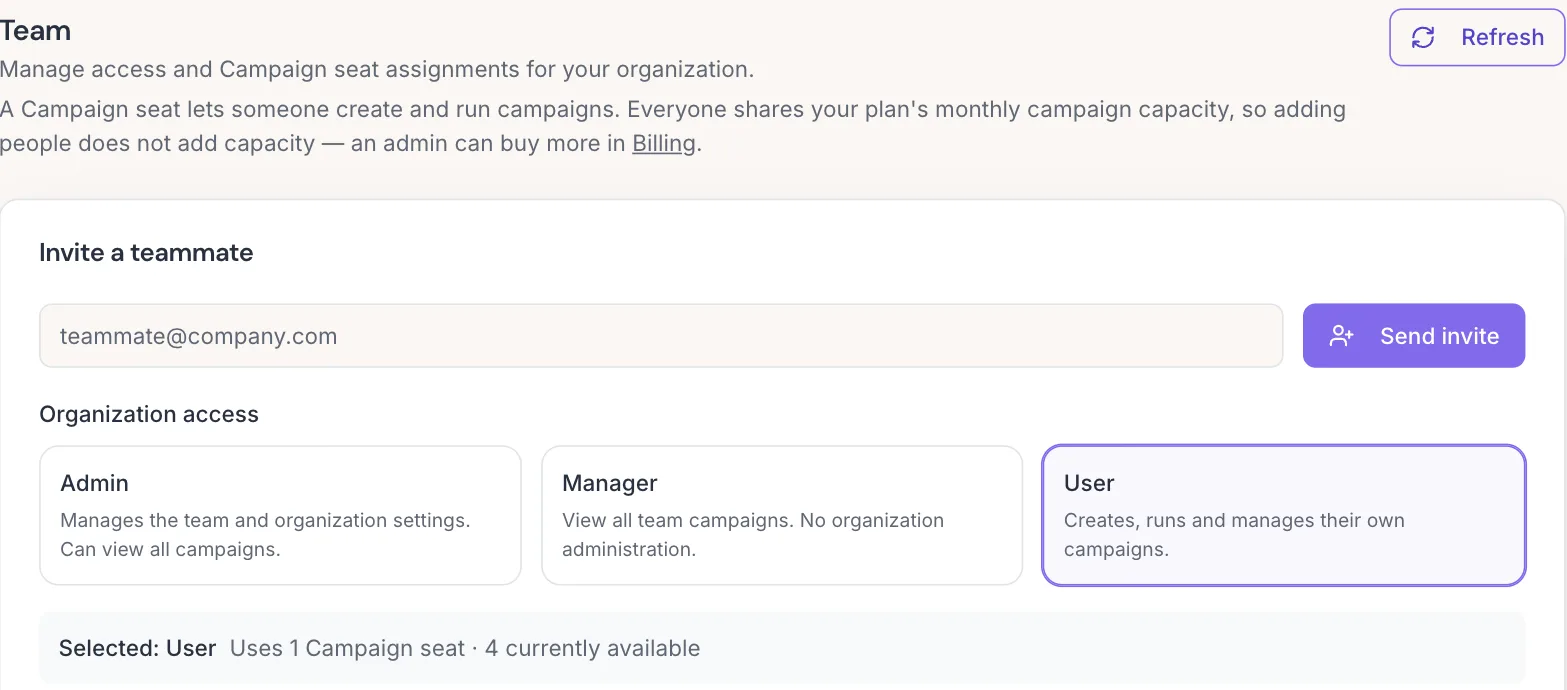
AvairAI runs as an organization. Three roles cover who can do what: Admin, Manager and User. Campaign seats cover who can create and run campaigns: 3 on Professional and 10 on Growth and Concierge are included, and extra seats are $99 a month on any plan. Everything else belongs to the company, not the person: one subscription, one monthly campaign pool and one Tools credit pool, shared by everyone. Adding people adds hands. Add-ons and additional plan copies add capacity.
What each role can do
An Admin manages the team, billing, settings, sending infrastructure and API keys, and can read everything. A Manager has read-only visibility across the organization, can use Tools and changes nothing. A User owns their own campaigns, tasks and exports and can use Tools. Roles use the same names everywhere: the invite form, the member list, the seat panel, the audit log and the API.
Starting, completing, skipping and scheduling a task stay with the person it is assigned to. Managers and Admins can read the task, not run it.
Seats: one per person who runs campaigns
A campaign seat is a person who can create and run campaigns. Professional includes 3 seats, Growth 10 seats and Concierge 10 seats. Extra seats are $99 a month each, on any plan, without a sales call. A purchased seat adds a person and nothing else: no extra campaigns, no extra credits.
An Admin or Manager who does not run campaigns does not need a seat and is free. An Admin who does run campaigns holds a seat, and the member list says so. A five-person team with two reps pays for two seats.
One shared pool per company
Monthly campaign creates and runs belong to the company. So do Tools credits. Everyone draws from the same pool, and when it is spent the whole company has reached its limit. That is deliberate: capacity grows through add-ons ($40 a month to create 1 more campaign, $100 a month to create and run 1 more) or through another copy of your plan, which brings its seats, campaigns, credits, domains and mailboxes again. A company can hold up to 2 Professional plans or up to 10 Growth plans.
Offboarding in one step
When someone leaves, an Admin sees exactly what they hold: active and draft campaigns, open tasks, personal mailboxes, CRM connections and sponsored API keys. Offboarding transfers the work to a named colleague, pauses their mailboxes, stops their API keys, revokes access and releases the seat, all in one transaction. Removing yourself is deliberately not available; another Admin does it. Re-inviting someone later starts them fresh; old roles are not restored.
Every access change on the record
Invites, role changes, seat changes and removals are written to an audit log with who did what and when. Admins and Managers can see who ran which Tools, and contact email addresses never appear in those summary lines.
Team on every plan
Roles, shared capacity and guided offboarding are available on every plan, self-serve. No enterprise tier is required to run AvairAI as a team.
Frequently asked questions
Do I pay for Admins and Managers?
Only if they run campaigns. An Admin or Manager who does not create or run campaigns holds no seat and is free. Seats are for the people who run campaigns: 3 on Professional and 10 on Growth and Concierge are included, and extra seats are $99 a month.
Does adding a user add campaigns or credits?
No. A seat adds a person and nothing else. Monthly campaigns and Tools credits are one shared pool per company. Capacity grows through campaign add-ons or another copy of your plan.
Can my company have more than one plan?
Yes. A company can run up to 2 Professional plans, up to 10 Growth plans or up to 10 Concierge plans. Each copy brings its seats, monthly campaigns, Tools credits, sending domains and mailboxes again, and on annual plans the lead guarantee multiplies too.
What happens when someone leaves?
An Admin offboards them in one step: their campaigns and open tasks transfer to a colleague you name, their mailboxes are paused, their API keys stop, their access is revoked and their seat is released. Nothing they were running is lost.
If I re-invite a former member, do they get their old roles back?
No. A re-invited member starts fresh and is assigned roles again by an Admin. Their earlier access changes remain in the audit log.